
Assortment planning in Beauty & Cosmetics: the gaps your style-level reports can't see
Why beauty assortment reviews built on style-level rollups miss whitespace and over-assortment, and what attribute data has to look like to fix it.

A line review walks in with a deck of style-level sell-through charts, and walks out with a decision to add three SKUs and cut five. Nobody in the room disagrees with the math. The problem is the math never asked the right question, because the report was built at the style level, and a style is not where beauty demand actually lives. Demand lives one layer down, in the combination of shade, finish, format, and price that a customer is actually choosing between. Roll that layer up too early and you can't see it anymore.
Why style-level reporting hides the real decision
A typical planning report for a color cosmetics line shows units and sell-through by style: this foundation, that lip product, this palette. It's clean, it's fast, and it's almost always the level buyers and merchandisers were trained to think in. But a style is a container. Inside "Foundation, Style 4471" might sit twelve shades, three finishes, and two sizes, each performing completely differently.
When you aggregate to style, you get an average that describes nothing real. A style that looks like a solid mid-performer might actually be four dead SKUs propping up eight hot ones, or a shade range that's strong everywhere except the exact undertone segment a competitor just filled. Style-level reporting can tell you a line is "doing fine." It cannot tell you where the line is leaking, because leakage happens at the attribute level: a specific shade-finish-price combination that customers want and can't find, or one they've already told you, through returns and dead stock, they don't want more of.
Toolio's guide to assortment planning frames the width, length, and depth tradeoff the same way retailers have for decades: categories offered, items per category, variations per item, per Toolio's assortment planning guide. What's changed in beauty is what "variations" means. It used to mean a handful of sizes. Now it means dozens of shade, finish, format, and price combinations packed into a single style, which is exactly what a style-level report collapses back down to a single line.
Three failure modes an attribute view catches
Once you can group sell-through by attribute value instead of by style, three patterns show up that style-level reporting structurally cannot surface:
White space. A price band and finish combination customers are buying elsewhere in the category, and your line simply doesn't offer. Not underperforming. Absent. No SKU exists to even get a sell-through number.
Over-assortment. A cell in the matrix with heavy SKU count and weak sell-through per SKU. Six shades competing for the demand two shades could serve, each one diluting the others' velocity and tying up cash and shelf or PDP real estate that would earn more somewhere else.
Break points. The line between one attribute value and its neighbor where demand falls off a cliff. A price point just above where conversion drops. A finish sitting right next to a strong performer that never caught on itself. These boundaries matter for next season's range-building, and they're invisible when everything is bucketed at the style level.
Beauty specifically rewards this kind of analysis because price tiers are blurring right now, not consolidating. McKinsey's 2025 State of Beauty coverage points to consumers shopping value and prestige within the same basket, stretching across price bands rather than settling into one McKinsey's State of Beauty, June 2025. That's exactly the kind of cross-price-band behavior a style-level report can't segment. Whitespace mapping, treated as its own planning exercise rather than a side effect of the sales review, is showing up in beauty merchandising decks for the same reason, as GCI Magazine has covered.
A worked example: one lip color line, one attribute column
Take a mid-size lip color line: 40 styles, each with shade, finish (matte, satin, gloss, sheer), and price tier (mass, mid, prestige) as attributes. Style-level reporting shows total sell-through by SKU, ranked. Nothing jumps out except the usual long tail.
Now pivot the same sell-through data by finish and price tier instead of by style name.
| Finish x Price tier | SKUs offered | Sell-through | Signal |
|---|---|---|---|
| Matte, Mid | 11 | 38% | Over-assorted — too many SKUs splitting steady demand |
| Satin, Mid | 6 | 61% | Healthy depth |
| Gloss, Prestige | 0 | n/a | White space — competitors have SKUs here, this line has none |
| Sheer, Mass | 4 | 22% | Break point — demand drops sharply below this price tier |
The style-level version of this data told the team matte was "performing average." The attribute view says something else entirely: matte is over-assorted at the mid tier, gloss is missing entirely at prestige, and sheer falls off a cliff once it drops below mid price. That's a line rebuild, not a SKU tweak. Cut two or three matte-mid shades, greenlight a prestige gloss test, stop chasing sheer at the mass tier. None of that shows up until the report is built on the attribute columns rather than the style rollup.
What has to be true of the data before you can even build the matrix
That pivot only works if three things are true of the underlying attribute data, and in most PIMs and merchandising systems, none of them reliably are.
First, fill. Shade, finish, and price tier have to be populated on every SKU, not just the newest ones. Legacy lines built up over years of ERP migrations routinely have these fields blank on a third or more of active SKUs.
Second, standardization. "Satin," "Silk Finish," and "Semi-Matte" can't be three different values for what is functionally the same finish bucket, or the matrix fragments into cells too small to read. Free-text finish fields, entered by different merchandisers over different seasons, are the single biggest reason attribute-level rollups get abandoned in favor of the style-level fallback.
Third, correctness. A shade tagged "cool undertone" that's actually neutral throws off every rollup and every future recommendation trained on it, silently, because nobody reviews attribute values the way they review sales numbers.
Getting from where most beauty catalogs sit today to that clean matrix usually means extracting attribute values from the sources that already contain them: tech packs, shade swatches, ingredient decks, even product imagery. Then normalizing the vocabulary across seasons and vendors, and flagging conflicts for review instead of guessing. It's mechanical, repetitive work across thousands of SKUs, and it's the layer that has to be solid before any assortment matrix, forecast, or like-item comparison is worth trusting.
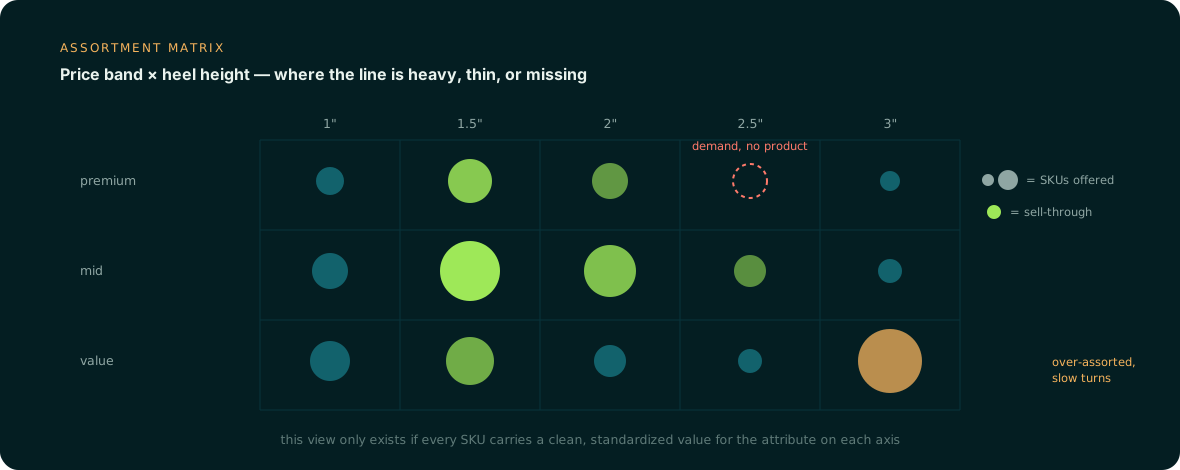
Your PIM is the right place for shade, finish, and price tier to live. Anglera doesn't replace it. It extracts those values from the source documents where they already exist, standardizes the vocabulary across seasons and vendors, and flags the ones it can't confidently resolve, so the attribute columns underneath your next assortment review are ones you can actually pivot on.