
You migrated the ERP. Your attributes came along unimproved.
ERP migrations validate structure and financial fields, not attribute content. Here's how to audit what came across and enrich what didn't.

The go-live retrospective always sounds the same. Cutover finished on schedule, the finance team reconciled the ledgers, and someone on the steering committee says a version of "we just spent eighteen months on our data, it has to be in great shape now." Then a demand planner opens the new item master looking for pack size or fiber content and finds the same free-text field, the same nulls, the same three spellings of the same color that were there in the legacy system. The record moved. The problem didn't.
What a migration program actually checks
A migration to SAP S/4HANA, or any modern ERP, is graded on a narrow set of criteria: did every record load, do the hierarchies resolve, do the financial postings tie out, does MRP run without erroring on a missing unit of measure. Those are real, hard problems, and migration teams earn their fees solving them. SAPinsider's 2025 research on the run-up to SAP's 2027 support deadline shows data quality still ranks among the top challenges organizations flag, but the fixes teams invest in are duplicate removal, format standardization, and mapping rules, not attribute-by-attribute accuracy review.
That distinction matters. Structure and format are migration's job: does the color field exist, is it the right data type, does it map cleanly from the legacy table to the new one. Content is not: is the value in that field actually the item's color, current and correct. CDQ's analysis of S/4HANA migration scenarios puts it bluntly: "it is common for data to be migrated hastily, with plans to clean it up post-migration," because "success metrics focus narrowly on achieving a functional go-live, rather than ensuring robust data quality." The garbage-in-garbage-out principle that governs SAP master data management doesn't pause for a system change. It rides along in the same fields, under the same governance gaps, into a system that's better at storing it.
The 95-percent-complete trap
This is where fill rate quietly lies to you. A field that was populated in the legacy ERP is populated after cutover too, because migration copies values, it doesn't validate them. A planning team pulls a completeness report, sees material attributes sitting at 94 or 96 percent fill, and reads that as a green light. But fill rate only tells you a cell isn't blank. It says nothing about whether "misc" is a real fiber content, whether a dimension was last verified in 2019, or whether two plants are using the same attribute code to mean different things.
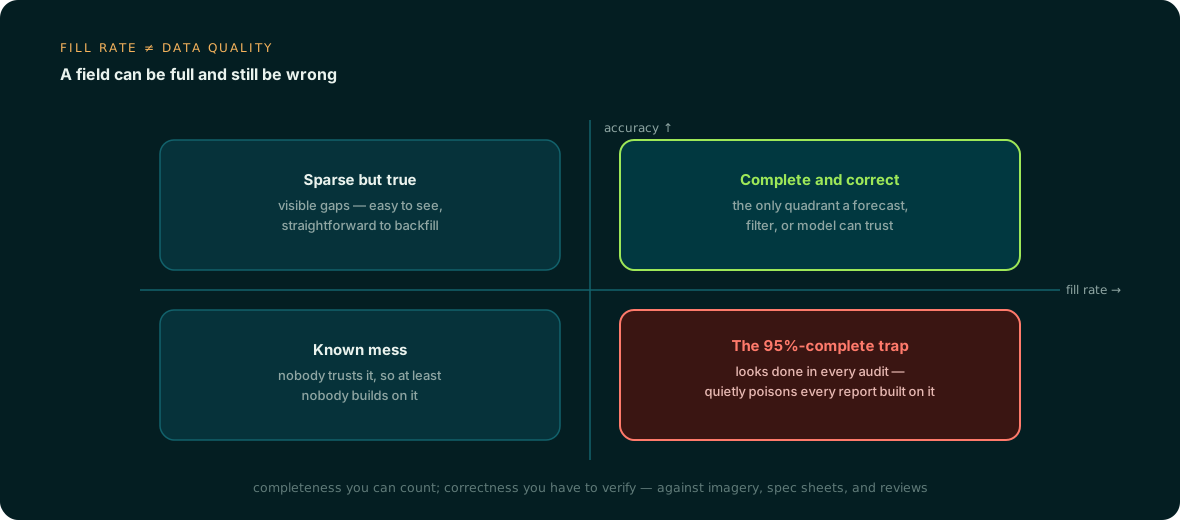
High fill, low accuracy is the quadrant that does the most damage, because it's invisible in every dashboard that only measures completeness. A forecast built on attributes in that quadrant will run, produce a number, and look confident. The number is wrong, and nobody catches it until the allocation is off or the like-item substitution model matches two products that shouldn't be near each other.
Target Canada as the cautionary case
The industry doesn't need a hypothetical here. Target's 2013-2015 Canadian expansion is one of the most widely documented ERP-adjacent failures on record, and inaccurate item data was a central cause: dimensions, weights, and other product attributes fed into the SAP system were wrong or missing at a scale that broke replenishment and inventory accuracy, contributing to empty shelves, overstock in the wrong places, and eventually the closure of 133 stores. It's a public case study at this point, cited across ERP and retail analyses of what happens when structural go-live is treated as data readiness. The lesson generalizes past that one company: a system migration is a data-transport event, not a data-quality event, unless someone explicitly makes it one.
Auditing what actually came across
Before assuming anything improved, sample it. A useful audit checks the same handful of things across a random set of SKUs, ideally weighted toward high-volume and newly launched items where forecast error is most expensive.
| Check | What it reveals |
|---|---|
| Free-text fields (color, material, fit) | Whether values are structured enough to group, filter, or feed a model |
| Last-updated timestamp on descriptive attributes | Whether the value predates a spec change, reformulation, or resize |
| Placeholder values ("TBD," "misc," "0000") | Fields that read as filled but carry no information |
| Cross-plant or cross-brand consistency | Whether the same attribute means the same thing everywhere it's used |
| Attribute-to-source traceability | Whether a value can be checked against a tech pack, spec sheet, or image |
None of this requires touching the new ERP's configuration. It's a query against the item master plus a spot check against source documents, and it usually takes a planning or catalog ops team a few days to surface a pattern: the attributes causing the most forecast noise were never accurate, they were just consistently wrong in a field that migrated cleanly.
Why the post-migration window is the moment to enrich
Paradoxically, the weeks after go-live are close to the best time to fix this, for reasons that have nothing to do with the new software being smarter. Join keys are freshly mapped, so style number and SKU line up cleanly across systems without the drift that accumulates over years. Governance attention is unusually high, because the organization just spent a budget cycle talking about data ownership and stewardship. And the appetite to touch the item master again is still warm, before it cools into "don't break what we just stabilized."
That's also why enrichment has to be additive rather than another rip-and-replace project. Nobody wants a second multi-quarter initiative right after finishing the first one. The practical path is to extract attributes from the source material that already exists, tech packs, spec sheets, product imagery, review text, validate the results against those sources with conflicts flagged rather than silently overwritten, and write clean values back into the fields the new ERP already has. A flat export of style numbers and SKUs is enough to start; the enrichment work runs in parallel with normal operations rather than as another cutover.
A demand forecast is an aggregation across attributes: category, subcategory, material, price tier, size run. If those dimensions are noisy, every rollup built on them inherits the noise, no matter how modern the system doing the summing is. Anglera doesn't replace the ERP or the PIM you just migrated to. It sits on top, keeps pulling from the source documents that describe what a product actually is, and keeps those attributes current after the migration project team has moved on to the next thing.
Hero photograph by Olga Kovalski on Unsplash