
Why your B2B site search returns bad results
B2B site search usually fails on catalog data: unnormalized part numbers, missing cross-references, free-text specs and missing trade synonyms.

B2B site search usually returns bad results because the catalog behind it is incomplete or inconsistent, not because the engine is broken: part numbers are stored in one format and typed in another, specs live in free-text descriptions instead of structured attributes, and the trade terms buyers use appear nowhere in the record. Fix it by sorting your failed queries by type, tuning the engine settings that exist for each type (typo tolerance, synonyms, analyzers), and repairing the product data the engine cannot invent.
In a distributor catalog, "search is bad" is four problems with different owners, and the zero-result log tells you which one you have.
Why B2B ecommerce search returns bad results, by query type
Pull 90 days of search logs and bucket every query that returned zero results, or returned results nobody clicked. Almost every query lands in one of these:
- Part-number and MPN queries.
HD4520,hd-4520,6203-2RS, a competitor's number, an old number. - Spec queries.
1/2 npt brass ball valve,3/8 x 2 grade 8 hex bolt,40 amp 2 pole breaker. - Jargon and synonym queries. Trade slang, abbreviations, brand-as-generic names.
- Genuine misses. You do not stock it, or the buyer typed something unrecoverable.
Each bucket has a configuration fix and a data fix. The data fix is where the volume is.
Part-number search: normalization, cross-references and supersessions
Buyers type numbers the way their ERP, old invoice or box label prints them. InteractOne's write-up on part-number zero results gives the classic set: HD4520, hd-4520, HD 4520, 04520 all meaning the same part.
What the engine can do. Engines have documented settings for this. Algolia's search-by-SKU guide recommends adding the SKU attribute to disableTypoToleranceOnAttributes to turn off typo tolerance on that field (prefix matches still apply, so 123 can still match 123456), notes that hyphens are treated as separators by default so 123-X-456 and 123 X 456 return the same results, and says to index the unhyphenated 123X456 form alongside if buyers type it that way. That matters because, per Algolia's typo-tolerance docs, one typo is allowed by default on words of four or more characters, and typo tolerance is active on numbers unless you turn off allowTyposOnNumericTokens. In a catalog of near-identical part numbers, a typo match is a wrong part.
On Elasticsearch, the word delimiter graph filter splits tokens at letter-number transitions (XL500 becomes XL and 500), can emit a catenated form with catenate_all, and keeps the original with preserve_original. Elastic's docs suggest pairing it with the keyword tokenizer for product IDs and part numbers.
What the engine cannot do. No analyzer knows that your BRG-6203-2RS is the same bearing as the manufacturer's 6203-2RSH, or that a number discontinued in 2023 was superseded by a new one. That is data:
- A normalized
mpnfield per item, plus the manufacturer name, so the number can be matched without the distributor's prefix. - A
cross_reference_numbersfield holding competitor and OEM equivalents. These often exist in the ERP or a purchasing spreadsheet and never reach the search index. - A
supersedesfield, so a search for the old number lands on the replacement instead of a dead end.
Algolia's SKU guide also describes Rules, applied per buyer through rule contexts, that replace a buyer's alias with the real SKU. That can work for a handful of accounts; thousands of cross-references belong in the record.
Spec searches fail when attributes are missing or free text
A buyer typing 1/2 npt brass ball valve is running a filter query through the search box. The engine can only match it if connection_size = 1/2 in, connection_type = NPT and material = brass exist as fields on the record. If those values are buried in a supplier's long description, you get partial text matches ranked by accident, and the facets on the left side show nothing useful.
The failure is quieter than a zero result. A product missing the voltage value does not rank lower when a buyer filters to 120V; it disappears from the filtered set entirely. That is why faceted, attribute-based search depends on fill rate per category more than on the engine. Declaring an attribute in Algolia's attributesForFaceting makes it filterable; it does not populate it.
The second failure is inconsistent values. If sleeve_length holds Long, long sleeve, L/S and LS across suppliers, the facet shows four options for one value and each filter returns a fraction of the right products.
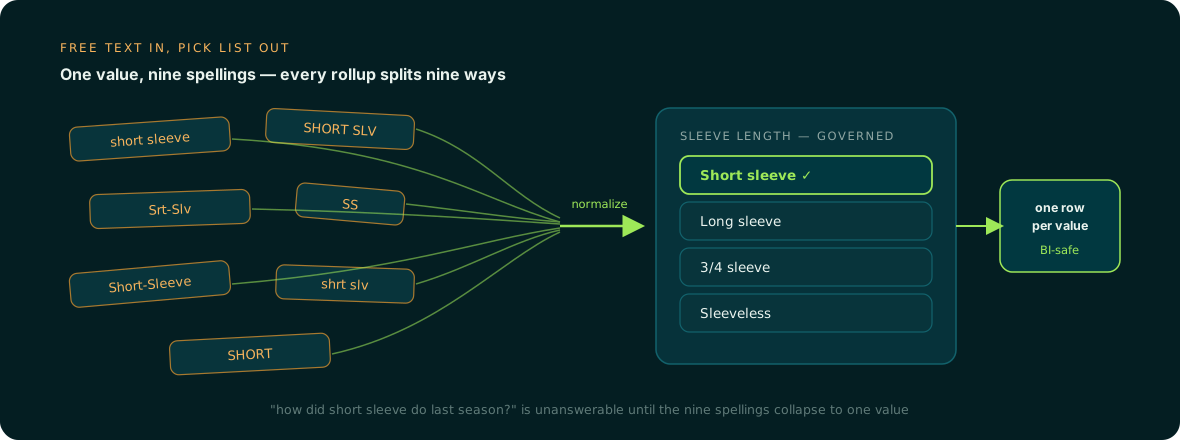
The fix is a governed pick-list per attribute, with units normalized (0.5 in, not 1/2", .5in and 12.7mm side by side) and a source document behind each value. Our guide on how to structure product attributes and values walks through the field design.
Synonyms, jargon and zero-result queries
Trade language is the third bucket. InteractOne's examples are a buyer typing zerk when the catalog says "grease fitting", or hex bolt when it says "hex cap screw". Optimizely's B2B search article uses GPF for gallons per flush. Every vertical has hundreds of these: SS for stainless, EMT for conduit, romex for NM-B cable.
This bucket is mostly engine configuration:
- Algolia supports regular (two-way) synonyms, one-way synonyms where a term finds its synonyms but not the reverse, alternative corrections that rank exact matches above synonym matches, and placeholders.
- Elasticsearch's synonym graph filter handles multi-word synonyms correctly, is designed for search analyzers only, and supports equivalent rules (comma-separated groups) and explicit one-way rules.
Use one-way synonyms for abbreviations that are ambiguous in your catalog. SS should find stainless steel, but a stainless query should not pull every record containing SS.
Synonyms expand the query, but if the record never says "stainless" in a structured material field, the expanded query still has nothing reliable to hit. Elastic's own piece on search governance shows how lexical and pure semantic retrieval each go wrong on their own, and calls constraints such as filters and boosts orthogonal to the retrieval method: they can be applied to lexical, semantic or hybrid search alike. Filters only work on attributes that are filled.
Which fixes are configuration and which are catalog data
| Symptom in the log | Engine configuration | Catalog data |
|---|---|---|
| Hyphen or spacing variants of a part number miss | Separator handling, delimiter analyzers, index an unhyphenated form | Normalized mpn field |
| Wrong part returned for a number | Disable typo tolerance on SKU and numeric tokens | Clean, deduplicated part numbers |
| Competitor or old number returns nothing | Rules for a few aliases | cross_reference_numbers, supersedes |
| Spec query returns loosely related items | Searchable attribute order, facets declared | Filled, structured spec attributes |
| Filter shows duplicate values | None | Governed pick-lists, normalized units |
| Trade term returns nothing | Synonyms, one-way rules | Values the synonym can land on |
AI product discovery, in your own semantic search or an outside assistant, leans on the same structured attributes when it filters and compares items. A better model does not fill an empty voltage field.
A zero-results triage routine you can run weekly
- Export last week's zero-result and no-click queries with counts.
- Classify the top 100 into the four buckets above. A regex pass catches most part numbers.
- Search the catalog yourself for each one. Does the product exist? If yes, which field should have matched?
- Route. Separator and typo issues go to whoever owns search config. Missing synonyms go into the synonym list as one-way or two-way rules. Missing cross-references, empty attributes and inconsistent values go to the product data queue.
- Fix the no-results page while you wait. Baymard's no-results research found nearly 50% of sites fail to give users an effective way to recover, and recommends related categories, alternative searches and help resources such as sales phone numbers or chat on that page.
- Re-run last week's list to confirm each fix actually returns the product.
For illustration, if 100 queries a week fail and 40 trace to missing attributes across 2,000 SKUs, the config work clears quickly and the attribute backlog remains. That backlog is why search projects stall: the demand you lose to abandoned searches keeps accruing while someone fills spec fields by hand. Related reading: why site search is only as good as your attributes.
Who does the catalog work
The engine team can own synonyms and analyzers. Nobody usually owns pulling thread_size, pressure_rating and cross-reference numbers out of 2,000 spec sheets, normalizing them, and keeping them current as suppliers revise their data. When it is handled as a one-off cleanup project, the gaps tend to come back with the next supplier feed.
That is the work Anglera does. Your PIM or ERP stores the data; Anglera extracts attribute values from manufacturer spec sheets, catalogs and sites, normalizes them to your pick-lists, scores each value against its source and flags conflicts for review, then keeps them maintained. It works from a flat export alongside whatever PIM, ERP or search engine you run, and a typical implementation takes 30 days or less, so the search config fixes you make this week have structured data to land on.