
Product taxonomy vs attribute schema: what is the difference?
A product taxonomy decides which category a product belongs to; an attribute schema defines the fields every product in that category must carry.

A product taxonomy is the category tree that decides where a product lives, such as Electrical > Circuit protection > Miniature circuit breakers. An attribute schema is the list of fields, data types, units, and allowed values that must be filled for products in a category, such as rated_current in amps or release_characteristic from a fixed list (B, C, D), and in most catalogs it hangs off the taxonomy node.
So the taxonomy answers "what kind of thing is this?" and the schema answers "what do we need to know about this kind of thing?" Classify the product once and the right questions come with it.
Product taxonomy vs attribute schema: the difference in practice
Shopify's own help center shows the link cleanly. Assign a product to Apparel & Accessories > Clothing > Clothing Tops > Shirts and nine category metafields become available, including size, neckline, sleeve length type, fabric, and color (Shopify Help Center). The category is the taxonomy. The nine fields are the schema for that node. Shopify's public taxonomy repository publishes categories, attributes, and values as three linked components, and the launch changelog put the size at over 10,000 categories and 2,000 associated attributes.
Taxonomist Heather Hedden frames the general distinction this way: metadata schemas organize data, while taxonomies organize controlled vocabulary concepts (Hedden Information Management). A category is a concept a product gets tagged with. An attribute is a slot that holds a value: text, a number with a unit, a yes/no, a range.
A few working rules fall out of that:
- A product has one primary category. It has dozens of attribute values.
- Categories drive browse paths, URLs, and channel category mapping. Attributes drive filters, comparison tables, search matching, and spec-based feeds.
- Changing a category moves a product. Changing a schema changes what every product in that node owes you.
Where the schema attaches: category node or product family
"Hangs off the taxonomy node" is the common pattern, but PIMs model it differently, and it matters when you design.
In Akeneo, the schema lives on the family. A family is defined as a set of attributes shared by the products in it, a product can belong to only one family, and the family defines completeness (Akeneo: What is a family?). Completeness is then calculated per channel and locale as the share of required attributes that have values (Akeneo completeness). Antavo's catalog docs state the separation outright: categories organize products into a hierarchy but do not determine which fields are available on a product; attribute families do (Antavo catalog structure).
The practical takeaway: whatever your system calls it, you need a one-to-one mapping between leaf categories (or product types) and attribute sets. If your web category tree and your PIM families drift apart, a product can sit in "Breakers" on the site while carrying the schema of "Electrical misc" in the PIM, and its filters will be empty. Our guide on how to build a product taxonomy that scales covers keeping those two trees aligned.
How to define which attributes each product category needs
Work leaf by leaf, and source every attribute from a reason. Four inputs cover most cases.
- Buyer filters and selection criteria. What does a buyer filter on before they will add to cart? For a breaker that is current rating, poles, and trip curve, not color. Pull this from on-site search logs, sales rep questions, and the spec tables in manufacturer catalogs.
- Channel requirements. Each channel you syndicate to has its own required fields by category. Google Merchant Center, for example, marks
coloras required for free listings in Apparel & Accessories (category ID 166) and for Shopping ads in that category in six listed countries (Google Merchant Center Help). Rules like this change, so confirm against the current spec for every channel before you lock the schema. - Industry standards. In electrical and technical goods, ETIM gives you a ready schema per class. ETIM groups products into classes, and each class carries features of four types: alphanumeric with a fixed value list, logical yes/no, numeric, and range; numeric and range features need a unit, except counts such as "number of" features (ETIM model information). If your trading partners exchange ETIM data, start from the class rather than inventing fields.
- Identity and compliance. Fields every SKU needs regardless of category: MPN, brand, GTIN where one exists, and any certification marks your market requires.
Then tier each attribute:
- Required: a product cannot publish without it. Keep this short; every required field is a field someone has to fill for every SKU.
- Recommended: drives filters or channel quality scores; tracked in completeness but does not block.
- Optional: useful detail that ships when the source has it.
For each attribute, lock the data type, unit, and allowed values before anyone starts filling. More on that in how to structure product attributes and values.
Worked example: category-specific attributes for a miniature circuit breaker
Take ETIM class EC000042, Miniature circuit breaker (MCB), in group EG000020 Circuit breakers and fuses. In the ETIM 10 viewer the class lists 47 features, from Built-in depth (EF000218) to Residential and tertiary product standards (ETIM viewer, EC000042). Nobody should make all 47 required. Here is one illustrative way a distributor could tier them, using the feature names and codes as ETIM publishes them:
| Tier | ETIM feature (code) | Type and unit | Why it is in this tier |
|---|---|---|---|
| Required | Rated current (EF000227) | Numeric, A | First filter a buyer uses |
| Required | Release characteristic (EF000889) | Alphanumeric list | Trip curve decides fit for the load |
| Required | Number of poles (total) (EF008618) | Numeric | Must match the circuit |
| Required | Rated short-circuit breaking capacity Icn per IEC 60898-1 at 230 V, AC (EF027114) | Numeric, kA | Spec and code compliance |
| Recommended | Width in number of modular spacings (EF002950) | Numeric | Panel fit |
| Recommended | Rated operational voltage, AC (EF027112) | Numeric, V | Common filter |
| Recommended | Degree of protection (IP), front side (EF003118) | Alphanumeric list | Enclosure selection |
| Optional | Power loss (EF005387) | Numeric, W | Engineering detail |
| Optional | Tightening torque (EF005520) | Range, Nm | Installer detail |
Notice what the taxonomy did and did not do. Placing the SKU in the MCB node told you which 47 questions exist. It told you nothing about the answers. "16 A, C curve, 1 pole, 6 kA" lives in the manufacturer's datasheet, and the schema is just the form waiting for it.
Also notice what stays out of the tree. "C-curve breakers" and "16A breakers" are tempting category names. They are attribute values. Turn them into categories and you get duplicate placements, broken channel mappings, and a tree that grows every time a new rating ships.
What goes wrong when the schema is not maintained
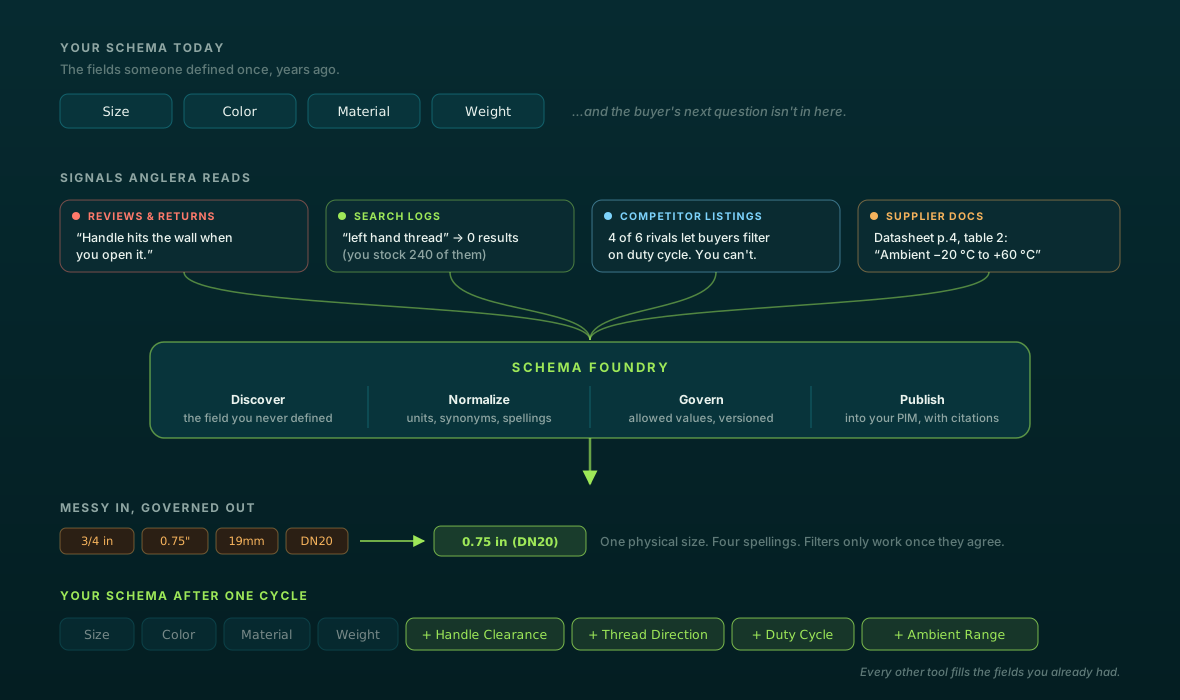
Schemas are not set once. New channels add required fields, standards release new versions, and product teams invent local fields like amps, Amperage, and current_rating that all mean EF000227. Left alone, one fact ends up in three columns and no filter shows all of them. It is fixable; see consolidating a splintered attribute schema.
The other failure is a schema that only grows. Every attribute added is a backfill across every SKU in that node. A useful test before adding one: would a buyer filter on it, does a channel require it, or does a standard define it? If none of those, leave it optional.
Who fills the schema once it is defined
Defining the taxonomy and schema is design work. Filling it is the larger job. For illustration, 5,000 MCB SKUs with four required and three recommended attributes is 35,000 values, each one read off a datasheet and normalized to the right unit and value list.
That is the work Anglera does. Your PIM stores the data; Anglera extracts attribute values from spec sheets, catalogs, and manufacturer sites, normalizes them to your schema, quality-scores each value, and flags conflicts for review rather than guessing. It works with whatever PIM, ERP, or flat file you already run, typically goes live in 30 days or less, and when you add a new attribute to a node it can be backfilled across the catalog. Schema Foundry covers the schema side, keeping the data model current as new attributes and sources show up.
Get the taxonomy right and every product inherits the right questions. Get the schema right and those questions are specific enough to answer from a datasheet. Keeping both answered across a changing catalog is a maintained practice, and that is the part Anglera is built to carry.