
Why retailers reject your product data submissions (and how to stop it)
Retailers reject product data for missing required attributes, invalid GTINs, wrong categories, off-spec images, unit errors, and restricted claims.

Retailers reject product data submissions when a record fails their automated validation: a required attribute is blank, the GTIN is invalid or does not match the brand, the item sits in the wrong category, an image breaks the spec, a value is in the wrong unit or format, or the copy makes a claim the channel restricts. Most rejections trace back to one of those six causes, and many of them start the same way, with a separate spreadsheet hand-edited for each retailer instead of one complete master record mapped to each retailer's template.
The six reasons retailers reject product data submissions
1. Missing required attributes, including the conditional ones
Walmart's supplier documentation lists missing required attributes, invalid GTIN/UPC formats, conflicting product data, and outdated item spec versions as the common cataloging problems. The blank-field case is easy to catch. The conditional case is not.
Conditional fields only become required once another value is set. In Walmart's marketplace schema, answering yes to isPesticide makes pesticide_type conditionally required, and the schema notes that missing conditionally required attributes cause submission failures. Google does the same thing by category: apparel items need gender, size, color, and age_group, fields a hardware item never sees.
2. Invalid or mismatched identifiers
Google requires that a GTIN's check digit be present and correct, that UPCs run 12 digits and EANs 13, that each color or size variant carry its own GTIN, and that restricted prefixes such as 02, 04, and 2 stay out. It also limits the performance of items where the GTIN is not associated with the submitted brand. The usual culprits are spreadsheet damage: a leading zero stripped by Excel, a case-pack GTIN pasted into the each-level row, or one parent UPC copied across six sizes.
3. Wrong category
Category decides which attribute set applies. As Inriver's marketplace guide puts it for Walmart, a wrong category selection means missing required fields. Google will disapprove an item whose google_product_category is not a predefined value; a full path like Apparel & Accessories > Clothing > Dresses or its numeric ID is accepted, but not both. Custom labels belong in product_type.
4. Images that break the spec
Google's primary-image rules bar calls to action, price or discount text, watermarks, barcodes, borders, and "coming soon" placeholders, and a file named .jpg that is really a PNG triggers an error. Fashion marketplaces go further. ABOUT YOU lists non-white or non-light-grey backgrounds, wrong viewing angles, and photos that do not match the selected color among its rejection reasons, and says image problems are the most frequent cause.
5. Unit and format errors
Validators compare types, not intent. Walmart's schema expects package width, height, and depth in inches and weight in pounds, as non-negative numbers with up to four decimals, and dates such as releaseDate in yyyy-mm-dd. A supplier sheet that says 30 cm or 1.2 kg, or a date typed as 3/1/26, fails even though the information is correct.
6. Restricted claims and terms
Some rejections are about what the copy says. Under EPA policy, the treated-articles exemption covers claims that protect the article itself and does not extend to implied or explicit public health claims against human pathogens. So "antimicrobial cutting board that kills germs" in a bullet turns a kitchen product into a pesticide claim, which channels that screen for pesticide claims may flag or block. ABOUT YOU also rejects blocklisted terms or designs too close to protected marks.
| Rejection cause | What the validator checks | Where the fix belongs |
|---|---|---|
| Missing attributes | Required and conditional fields per category | Master record completeness |
| Identifiers | GTIN length, check digit, variant uniqueness, brand match | Master record, at the variant level |
| Category | Value exists in the retailer's taxonomy | Mapping layer |
| Images | Background, overlays, angle, file type | Asset library plus per-channel rules |
| Units and formats | Unit, decimals, enum, date pattern | Canonical value in master, convert in mapping |
| Claims | Restricted terms in title, bullets, images | Master copy review |
Requirements change by version and by category, so treat the citations above as examples and confirm against each retailer's current portal or item spec before a submission.
Why the same product passes at one retailer and fails at another
Every receiver layers its own rules. In GS1's Global Data Synchronization Network, suppliers and retailers exchange master data through certified data pools on a publish-subscribe model, with the GS1 Global Registry pointing each subscription to the pool that holds the data. GDSN applies a small set of global validation rules, then country and industry profile rules, and in some pools retailer-specific quality rules on top.
So a record can be valid GDSN and still fail a given retailer, and a record built to one retailer's template can fail the next. The GTIN, the dimensions, and the core attributes travel; the category mapping, enum values, and image rules do not. If those receiver-specific layers are where your team does its editing, every retailer becomes a separate copy of the truth.
How to send product data to multiple retailers in different formats
The structural fix has three parts.
- One enriched master record per SKU. Every attribute any channel needs, stored once, in canonical units (store
12.0with unitin, never the string12 in), with the GTIN at the variant level and a source for each value. - A mapping layer per retailer. Category crosswalks, enum translations (
Stainless Steeltostainless_steel), unit conversions, and character limits live here as rules, not as hand edits. - Validation before send. Run each retailer's required and conditional rules against the mapped output and fix gaps in the master, not in the export.
Whether the mapping runs in your PIM, a syndication platform, or a data pool is a tooling choice; our breakdown of PIM versus syndication and the guide to choosing a content syndication platform cover where each fits. What no syndicator can do is map a value that does not exist.
For illustration: a brand with 3,000 SKUs selling through four retailers, editing per-retailer sheets, maintains 12,000 rows. A change to one product's net weight is four edits, and the one that gets missed comes back as a rejection. With a master record and mapping rules, the same change is one edit and four regenerated feeds.
Who does the work of filling the master record
Rejection reports usually point at the same gap: the master record was never complete. Conditional attributes like material, voltage, or countryOfOriginSubstantialTransformation sit in spec sheets, packaging, and manufacturer PDFs, not in the ERP export that seeded the PIM.
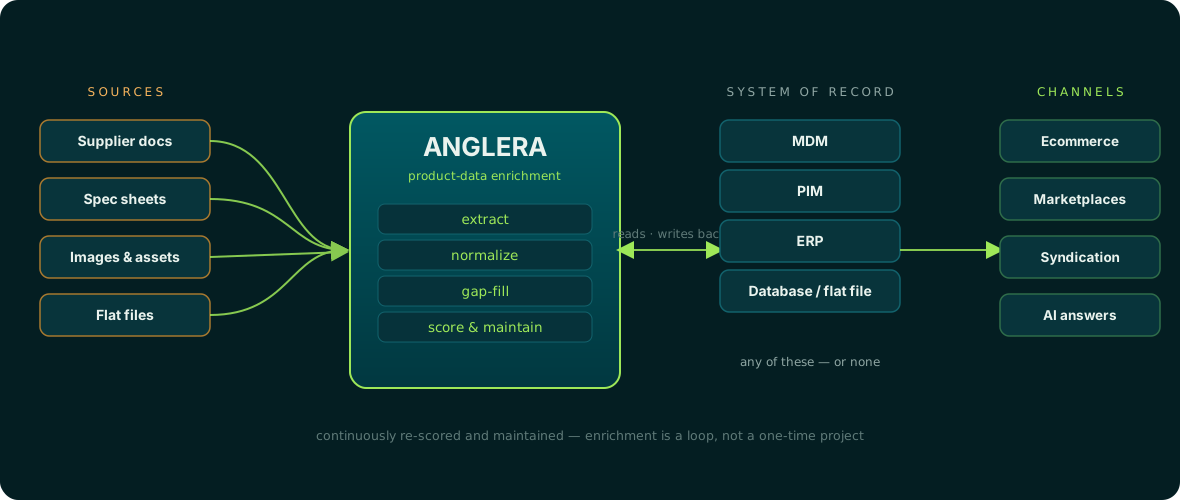
That extraction work is what Anglera does. Your PIM stores the data; Anglera does the work of pulling attribute values from source documents, normalizing units and formats, scoring each value, and flagging conflicts for review rather than guessing. It sits alongside any PIM, ERP, syndication platform, or flat file, and a new attribute a retailer starts requiring can be backfilled across the catalog. See how it works.
If your channel mix leans on a shared data pool, read why a shared content pool is not the same as complete data. For marketplace-specific rules beyond retailer onboarding, see marketplace content compliance.
Reading a rejection report: a triage order
When a batch bounces, sort errors before fixing them:
- Identifier errors first. A bad GTIN can block the item entirely, and fixing it may change which existing listing the retailer matches.
- Category second. Correcting it changes which attributes are required, so do it before filling fields.
- Missing attributes third, fixed in the master record so every channel gets them.
- Units, enums, and images last, as mapping rules, so the same error does not recur on the next 500 SKUs.
Track which errors repeat across retailers. A field missing at three retailers is a master-data gap; a field wrong at one is a mapping rule.
Most rejections are a symptom of an incomplete or inconsistent master record, surfaced by a retailer's validator. Anglera fills that record from the documents you already have, typically within 30 days and starting from a CSV or ERP export, so the feeds your PIM or syndicator sends have something complete to map.