
How to extract product attributes from spec sheet PDFs
Run OCR and table extraction on the spec sheet PDF, then map cells to your attribute schema, normalize units, split model rows into SKUs, and validate.
To extract attributes from a product spec sheet PDF, run it through a layout or table extraction service (Amazon Textract, Azure Document Intelligence, Google Document AI, or Adobe PDF Extract) to get text and table cells, then map those cells onto your own attribute schema, normalize units, resolve which value belongs to which model or SKU, and validate the result before it reaches your PIM. The extraction services handle step one well; steps two through five are where spec sheet projects succeed or quietly fail.
What the OCR and table extraction services return
All four return document structure, not product attributes.
AWS Textract. The AnalyzeDocument API takes a FeatureTypes list; adding TABLES returns table cells and cell text, FORMS returns key-value pairs, and QUERIES lets you ask a question and get a question-answer pair back. On tables, Textract returns cells, merged cells, column headers, titles, section titles, footers, and whether the table is structured or semi-structured. One detail matters for spec sheets: each CELL block always has a row span and column span of 1, and merged cells are expressed separately as MERGED_CELL blocks that point to the cells they combine. If your code reads only CELL blocks, a shared value printed once across three model columns shows up in one cell and the other two look empty.
Azure AI Document Intelligence. The layout model combines OCR with deep learning models to extract text, tables, selection marks, and document structure. Table output includes row and column counts, row span and column span, and a columnHeader flag per cell, and it can emit Markdown (in v4.0 GA, tables render as HTML inside that Markdown so merged cells survive). For tables that run across pages, Microsoft's documentation suggests splitting the PDF into pages and post-processing the results back into a single table, so stitching continuation tables is largely your job.
Google Document AI. The Form Parser extracts key-value pairs, tables, checkboxes, and generic entities, but Google states it handles simple tables with no cells that span rows or columns, and points to the Custom Extractor for anything more complex. The processor list also includes an Invoice Parser with line-item fields such as line_item/product_code, line_item/description, and line_item/unit_price. That is a procurement processor: it reads what you were billed for, not pressure_rating or end_connection.
Adobe PDF Extract API. PDF Extract works on native and scanned PDFs, returns structured JSON or Markdown, identifies cells that span multiple rows or columns, and can optionally deliver table data as CSV or XLSX files alongside the JSON.
Each gets you a faithful grid of strings with coordinates. None knows your schema calls it max_working_pressure_psi.
Extracting attributes from a multi-model spec sheet PDF
For illustration, take a two-page submittal sheet for a family of bronze ball valves. Page one has a hero photo, a features paragraph, and a dimension drawing. Page two has the spec table, laid out the way most manufacturers print it, with models as columns:
| Row label | BV-050 | BV-075 | BV-100 |
|---|---|---|---|
| Size | 1/2 in | 3/4 in | 1 in |
| End connection | FNPT (spans all three columns) | ||
| CWP | 600 WOG (spans all three columns) | ||
| Dim A | 2.13 | 2.48 | 3.00 |
| Weight | 0.42 | 0.68 | 1.05 |
| Footnote | For lead-free, add suffix -LF. Dimensions in inches, weight in lb. |
A clean OCR pass captures every string. Here is what still goes wrong.
The table is transposed. Extraction returns rows; your catalog wants one record per SKU. Each column has to become a product, with the row labels as attribute keys.
Shared values land on one model. FNPT and 600 WOG are printed once across all three columns. Read only the per-cell grid and BV-075 and BV-100 get no end connection and no pressure rating. This is exactly the merged-cell case Textract and Azure expose explicitly, and the one Form Parser does not handle.
Units live outside the cells. 2.13 means nothing until you read the footnote that says inches. The 600 WOG value encodes both a number and a rating basis (water, oil, gas), which a schema should keep as separate fields or a controlled value, not a free-text string.
The footnote creates SKUs. "Add suffix -LF" means the sheet describes six orderable items, not three, and the lead-free variants differ in a compliance attribute you probably filter on. A naive pipeline creates three records and misses the other three entirely.
Page one holds attributes too. Body material, seat material, and certifications often sit in the features paragraph, not the table. Table-only extraction leaves them blank.
The fix for each of these is not better OCR. It is knowing the target.
Turning cells into attributes your catalog can use
Attribute extraction starts from the schema, not the PDF. Before parsing anything, define for the category which attributes exist, their data types, allowed values, and canonical units. Our guide on how to structure product attributes and values covers that design; Anglera's Schema Foundry builds category schemas of that shape so extraction has something specific to aim at.
With a schema in hand, the pipeline looks like this:
- Extract layout. Run the PDF through one of the services above and keep the full block structure, including merged cells, headers, footers, and page numbers.
- Detect orientation and the model axis. Decide whether models run across columns or down rows, and identify the model or part-number header. This is the variant resolution step: every value must be tied to exactly one model before it goes anywhere.
- Propagate spans and footnotes. Expand merged cells to every model they cover, and apply table-level footnotes (units, suffix rules, "except" notes) to the values they govern.
- Map labels to schema fields.
CWP,Max. Pressure, andWorking Pressureshould all resolve to the same field. Keep a synonym map per category and log every label you could not map rather than dropping it. - Normalize values. Convert to canonical units, split compound values (
600 WOGinto a number and a rating basis), and snap free text to allowed values (FNPTtoFemale NPT). - Expand variants. Apply suffix rules to generate the full SKU set, carrying shared attributes and overriding only what changes.
- Record provenance. Store the source file, page, and table cell behind each value so a reviewer can check it in seconds.
Steps two through six are where the hours go. The same logic applies to the bills of materials and tech packs covered in extracting attributes from BOMs and tech packs.
How to QA extracted spec sheet data
Extraction errors are rarely random. They cluster by layout, so QA should too.
- Range and type checks. A ball valve weighing 42 lb at
1/2 inis a decimal you lost; a pressure rating of6is a dropped zero. Set plausible ranges per category and attribute. - Cross-model monotonicity. Within a family, size, weight, and dimensions usually rise together. A 1-inch valve lighter than a half-inch valve points to a column shift.
- Fill-rate by attribute. If
end_connectionis filled on one model in three, you have a span problem, not a data gap. - Conflict flags. When the PDF disagrees with the manufacturer's website or your ERP, flag it for review with both sources attached instead of letting the last write win.
- Sampled human review by layout. Review a handful of SKUs per manufacturer template, not a random sample of the whole catalog. One fixed template fix corrects every sheet that shares it.
When a regulation adds an attribute, as in the HVAC A2L transition, you re-run extraction for one new field across existing PDFs. That only works if the pipeline and provenance are already in place.
Deciding who does the work
For a few dozen sheets from one manufacturer, a script on top of Textract or Azure plus a careful afternoon of review is reasonable. The cost climbs with template variety, not page count. For illustration, a catalog drawing on 400 manufacturers with three spec sheet layouts each is 1,200 templates to handle, before anyone revises a sheet.
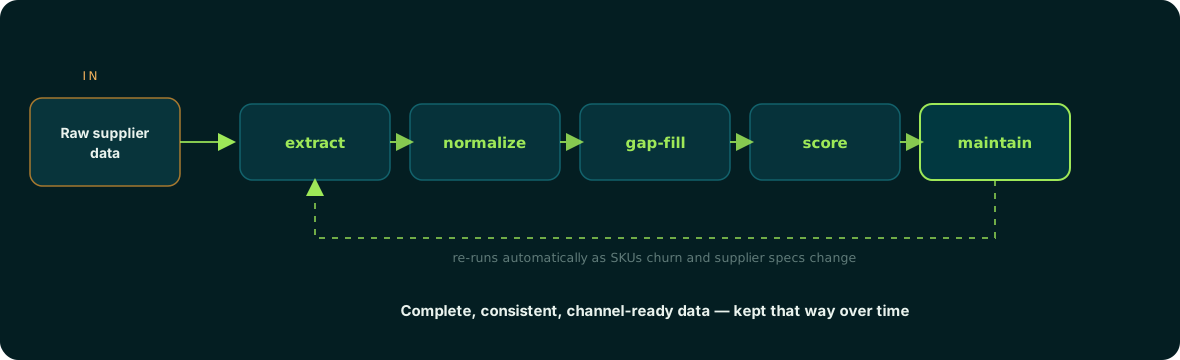
Teams then choose between maintaining the pipeline in-house, a one-time data entry project, or an enrichment layer. Anglera sits in that third slot: your PIM stores the data, and Anglera does the work of extracting values from spec sheets, catalogs, and manufacturer sites, normalizing them to your schema, scoring each value, and flagging conflicts for review. It works alongside whatever PIM, ERP, or flat file you already have.
Where to start with your own PDFs
Pick one category, write the schema first, and run twenty spec sheets from five different manufacturers through layout extraction. Count how many values needed span propagation, footnote units, or variant expansion; that count, not OCR accuracy, tells you how big the job is. If the answer is bigger than your team wants to maintain, Anglera can take that work on as an ongoing, source-grounded practice, with typical implementation in 30 days or less.