
How distributors sync ERP item data with their website
Distributors sync ERP item data to their site via a native connector, middleware, a PIM in the middle, or scheduled file exports. The ERP owns price and stock.

Distributors sync ERP item data with their website in one of four ways: a native connector between the ERP and the storefront, a middleware or iPaaS layer that maps and schedules the flows, a PIM that sits between the two, or scheduled flat-file exports picked up by an import job. In every pattern the ERP should stay the source for price, inventory, customer-specific pricing and item status, while descriptions, specs, images and filterable attributes come from a PIM or enrichment layer, because the ERP item master usually never held them.
A sync moves data. It cannot create attributes the ERP never had.
The four integration patterns distributors actually use
Native connector. The ecommerce platform or ERP vendor ships a prebuilt integration. It is the fastest to stand up and the least flexible: you get the field mappings the connector author chose. Fine when your item master is clean and your storefront needs little beyond item number, description, price and quantity.
Middleware or iPaaS. A platform in the middle pulls from the ERP, transforms, and pushes to the store and other channels. Alumio, for example, describes its use case as syncing product data, prices and stock from the ERP and PIM to every sales channel, with updates landing in real time or on a schedule. This is the right pattern when you have more than one destination (a B2B portal, a B2C store, marketplace feeds) and need logging and retries you can see.
PIM in the middle. The ERP sends the commercial record (item number, UOM, status) to the PIM. The PIM holds the content and attribute model and publishes complete products to the website. Price and stock usually still flow straight from the ERP, because they change too often to route through a content system.
Scheduled file exports. A nightly CSV or XML export from the ERP lands on SFTP and an import job loads it. On the supplier side the equivalent is EDI: the X12 832 Price/Sales Catalog carries item identification, description, packaging and pricing by quantity and unit of measure from manufacturers to distributors, which is often how new item data reaches the ERP in the first place.
Which ERP item data belongs where
The cleanest integrations decide ownership per field before anyone writes a mapping. A workable default for a distributor:
| Data | System of record | How often it moves |
|---|---|---|
| Item number, UOM, pack qty, item status | ERP | On change |
| List price, contract and customer-specific pricing | ERP or pricing engine | On change or intraday |
| Inventory by warehouse | ERP or WMS | Near real time |
| Customer accounts, ship-tos, terms | ERP | On change |
| Long description, feature bullets | PIM or enrichment layer | When content changes |
Technical attributes (voltage, thread_size, material) | PIM or enrichment layer | When content changes |
| Images, spec sheets, SDS PDFs | PIM or DAM | When content changes |
| Category and filter assignments | PIM | When taxonomy changes |
AppSeConnect's list of ERP-to-ecommerce sync objects runs from customers and items through inventory, orders, shipping, invoices and tier and volume pricing. Notice what is missing: the attribute data that powers faceted search. That reflects what ERPs store. Our deeper look at why the ERP item master is not a catalog covers the field-by-field gap, and the PIM vs ERP breakdown covers which system should own what.
How the Shopify and Adobe Commerce product APIs expect an ERP sync to work
Both platforms publish APIs designed for an external system of record pushing into the store.
Shopify. Shopify's sync guide says the productSet mutation synchronizes "the complete state of a product with data from an external source in a single operation," for apps that manage product data in an ERP, PIM, spreadsheet, or custom database. Two details matter. Each call is a full state declaration, so options or variants you leave out of the input are removed. And it runs synchronously by default or asynchronously in the background for larger jobs.
Inventory is a separate call. Shopify's inventorySetQuantities mutation sets absolute quantities and supports a compareQuantity compare-and-set check for concurrent requests; the docs say to use it only when calling on behalf of the source of truth for inventory, which for most distributors is the ERP or WMS.
Customer pricing has its own model. In Shopify B2B, catalogs are assigned to company locations, a price list attached to the catalog sets the prices that location sees, and a publication controls which products are visible at all. Fixed per-variant prices are written with priceListFixedPricesAdd, which creates or replaces fixed prices that override the price list's percentage adjustment. An ERP contract-price table maps onto that structure, not onto the product record.
Adobe Commerce. Adobe's bulk endpoints accept an array of same-type calls in one request and split them into individual messages on a queue, for example POST /rest/STORE_VIEW_CODE/async/bulk/V1/products on PaaS installs (the SaaS route places async/bulk after V1), and Adobe says you must install and configure RabbitMQ before using the Bulk API. The response returns a bulk_uuid you use to check operation status later. In practice this means a large ERP catalog load is accepted fast and processed in the background, so your integration needs to poll for failures rather than assume an accepted request means the products are live.
Confirm against the current API version before you build; both platforms version their APIs and change limits over time.
What the sync cannot fix
Here is a typical ERP item record for a fastener:
ITEM 4471-0381 | HHCS 3/8-16X1-1/2 GR5 ZP | UOM EA | PACK 100 | STATUS A
A connector will carry that perfectly to the website. The product page will show a cryptic title, no image, no spec table, and it will not appear when a buyer filters by thread_size = 3/8-16 or grade = 5, because those values exist only as abbreviations inside one description string. The data was never there.
DCKAP's own guidance acknowledges this: an item that is active in the ERP but has no description, image or category should not auto-publish, and they suggest an "Active, Pending Enrichment" status that holds it back. That gate is sensible. It also means someone has to do the enrichment, or the gate becomes a permanent holding pen.
For illustration, take 20,000 SKUs that need ten attributes each from spec sheets, at 15 minutes per SKU for a person to find, read and key them. That is 5,000 hours before anything syncs. The integration budget rarely includes that line.
The other failure modes are quieter:
- Full-state overwrites. With a full-state call like
productSet, a sync that sends only ERP fields can drop variants or content that another system added, if the payload is not built from the merged record. - UOM mismatch. The ERP sells
EAwhile the site displays a box of 100; price per unit is then wrong by a factor of 100. - Write-back gaps. Attributes enriched in a PIM never return to the ERP, so quotes, EDI documents and the next ERP migration start from the thin record again. Our post on carrying attributes through an ERP migration covers that trap.
Deciding on a pattern, and who does the work
Pick the integration pattern by how many destinations you have and how often price and stock change. One storefront and a clean ERP: a native connector. Several channels, contract pricing, marketplace feeds: middleware. A large catalog with real attribute depth: a PIM in the middle, with price and inventory still flowing direct from the ERP.
Then answer the separate question: where do the attributes come from? That is where Anglera fits. Anglera extracts values from supplier spec sheets, catalogs, manufacturer sites and existing ERP fields, normalizes them to your attribute model, scores each value against its source, and flags conflicts for review. It works with whatever you already run, whether that is a PIM, the ERP directly, or a flat CSV export, and typically goes live in 30 days or less. The enriched record can be written back to the ERP and forward to the storefront and channels, so every downstream sync starts from complete data.
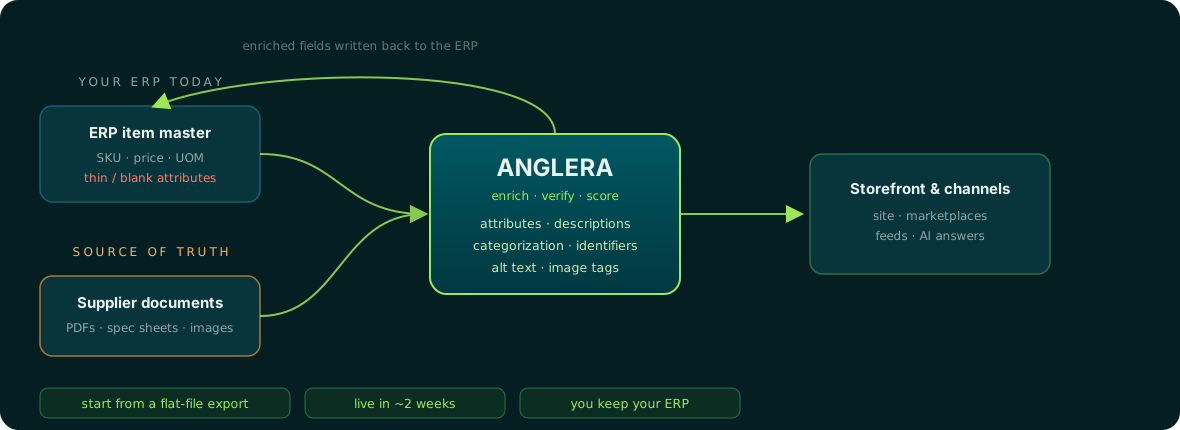
If you run Prophet 21, the PIM options for Epicor Prophet 21 page walks through how this looks on that stack.
Getting ERP product data onto the site without shipping empty pages
Choose the sync pattern for price, stock and customer pricing, and choose an enrichment practice for the content those flows cannot create. Your PIM or ERP stores the data; Anglera does the work of filling it from real source documents and keeping it current as suppliers change specs. See how Anglera works if your sync is finished but your product pages still are not.